In today’s fast-paced world, where virtual meetings dominate professional landscapes, tools like Otter AI are transforming how we capture and utilize conversation data. As a leading AI-powered transcription service, Otter AI helps users transcribe, summarize, and collaborate on meetings effortlessly. Whether you’re a busy professional, a student, or part of a large team, understanding what Otter AI offers can significantly boost your productivity. This review dives into its features, pricing, and real-world performance to help you decide if it’s the right fit.
What is Otter AI?
Otter AI is an innovative AI notetaker designed to turn voice conversations into actionable insights. Launched as a solution for recording and transcribing meetings, it uses advanced artificial intelligence to provide real-time transcription, automated summaries, and collaborative tools. Compatible with platforms like Zoom, Google Meet, and Microsoft Teams, Otter AI integrates seamlessly into your workflow, making it easier to review discussions without missing key details.
At its core, Otter AI focuses on accuracy and usability. It supports multiple speakers by identifying who is talking, which is crucial for group settings. With over a million users worldwide, including teams in tech, education, and media sectors, Otter AI has become a go-to tool for enhancing meeting efficiency.
Key Features of Otter AI
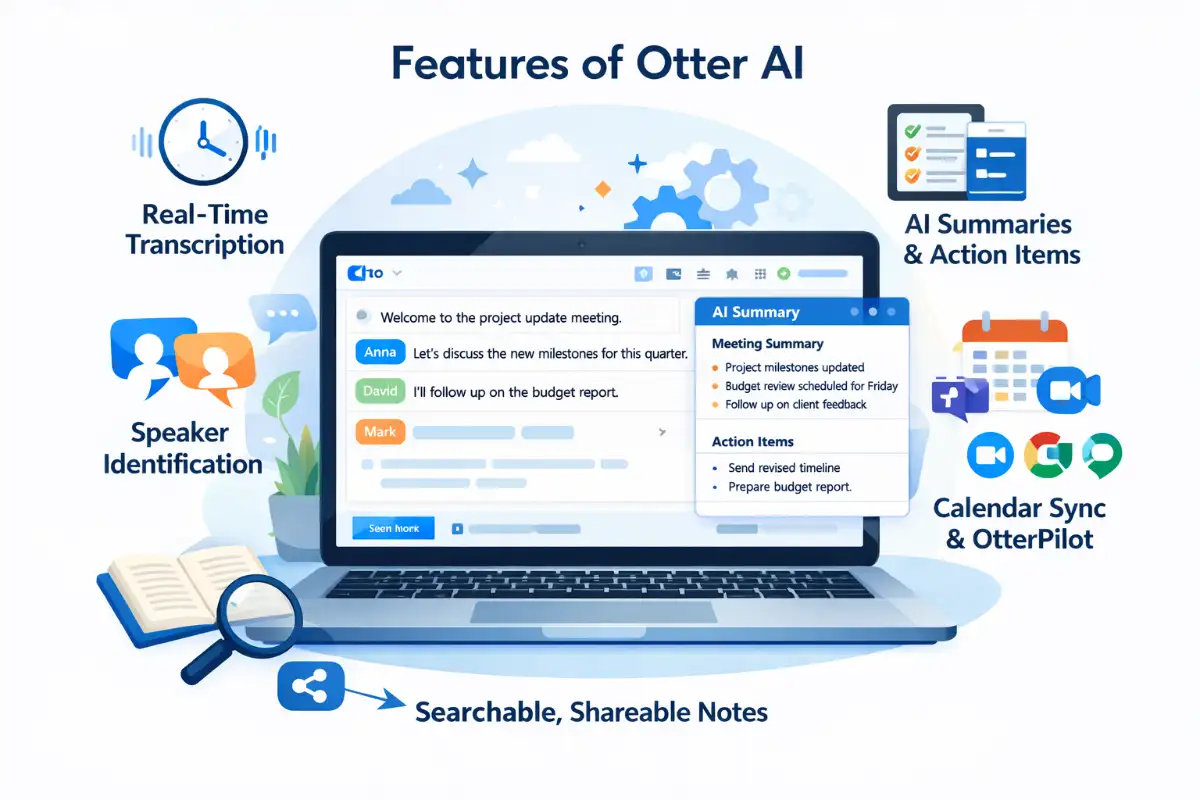
Otter AI stands out with its robust set of features tailored to modern work needs. One of the highlights is real-time transcription, where spoken words appear as text almost instantly. This allows participants to follow along, especially useful in noisy environments or for those with hearing impairments.
Speaker identification is another standout capability. The AI assigns labels to different voices, making transcripts easy to navigate. Coupled with AI-generated summaries, users can quickly grasp the essence of hour-long meetings in minutes. Otter AI also includes an AI Chat feature, enabling you to query transcripts for specific information, generate content, or collaborate with team members directly within the app.
Integration options are plentiful, supporting calendar syncing and automatic joining of scheduled calls via OtterPilot, the virtual assistant that attends meetings on your behalf. For added convenience, it offers mobile apps for on-the-go access and tools for editing, highlighting, and sharing transcripts.
Pricing Plans: Finding the Right Fit
Otter AI offers flexible pricing to suit various users, starting with a generous free Basic plan. This tier provides 300 minutes of transcription per month, with a 30-minute limit per meeting and three lifetime audio/video file imports. It’s ideal for casual users testing the waters.
The Pro plan, priced at $8.33 per user per month when billed annually (or $16.99 monthly), ups the ante with 1,200 minutes monthly, 90-minute meetings, and 10 file imports per month. It includes advanced search and custom vocabulary for better accuracy.
For teams, the Business plan at $20 per user per month annually (or $30 monthly) delivers 6,000 minutes, four-hour meetings, unlimited imports, and admin features like usage analytics. Enterprise plans are custom-priced, offering extras like HIPAA compliance and single sign-on.
Pros and Cons of Otter AI
Like any tool, Otter AI has its strengths and areas for improvement. On the positive side, its ease of use and powerful AI features, such as automated summaries and chat integration, make it a time-saver. The generous free plan allows broad accessibility, and integrations with popular meeting apps enhance its versatility.
However, some users report limitations, including monthly minute caps that can restrict heavy users and occasional transcription errors, especially with accents or background noise. The file import limits in lower tiers might frustrate those relying on pre-recorded content.
User Experiences and Ratings
Feedback from users paints a generally positive picture. With an average rating of around 4.08 out of 5 from over 900 reviews across platforms like TrustPilot and G2, many praise its accuracy and collaboration tools. Professionals in product management and podcasting highlight how it streamlines note-taking, though some express concerns over pricing changes and support responsiveness.
In educational and business settings, Otter AI is lauded for making information retrieval effortless, turning chaotic discussions into organized knowledge bases.
Is Otter AI Right for You?
Ultimately, Otter AI excels as a smart companion for anyone juggling multiple meetings or needing quick insights from conversations. Its blend of transcription prowess and AI-driven features adds real value, particularly for teams aiming to boost collaboration. If you’re seeking an efficient way to manage meeting overload, Otter AI deserves a spot in your toolkit. Start with the free plan to experience its benefits firsthand and scale up as needed.
FAQs
Is Otter AI free to use?
Yes, Otter AI offers a free Basic plan with 300 transcription minutes per month.
How accurate is Otter AI transcription?
Otter AI provides high accuracy but may vary depending on accents and background noise.
Does Otter AI work with Zoom and Google Meet?
Yes, it integrates with Zoom, Google Meet, and Microsoft Teams.
What is OtterPilot?
OtterPilot is Otter AI’s virtual meeting assistant that joins scheduled meetings and records notes automatically.